📜 Global Contracts
Comprehensive contract management system with automated data integration for real estate legal documentation
📋 Overview
The Global Contracts section is a comprehensive contract management system designed for administrative departments and real estate company managers to create, edit, and manage all legal contracts within the CRM system. This powerful module provides complete control over contract templates with automated data integration capabilities that automatically populate client, broker, project, and agent information into legal documents.
This is the central repository where all contracts in the system are stored and managed. You can add new contracts, modify existing ones, or delete outdated templates from this comprehensive contract management center, ensuring your real estate legal documentation remains current and professionally formatted.
⚖️ Complete Contract Management System
Global Contracts provides comprehensive management of all legal contract templates with advanced automation features that integrate real estate data directly into professional legal documents for efficient contract generation and processing.
🎯 Contract Management Capabilities
➕ Add New Contracts
Contract Creation: Create new legal contract templates with automated data integration capabilities for comprehensive real estate legal documentation and professional contract management.
✏️ Edit Existing Contracts
Contract Modification: Update and modify existing contract templates to reflect legal changes, policy updates, or business requirement adjustments while maintaining automated data integration functionality.
🗑️ Delete Outdated Contracts
Contract Removal: Remove obsolete or outdated contract templates from the system to maintain a clean, current, and legally compliant contract library for professional operations.
🔗 Advanced System Integration
⚡ Automated Data Population
Global Contracts automatically integrates with the CRM database to populate contract templates with real-time client, broker, project, and agent information, eliminating manual data entry and ensuring accuracy in legal documentation.
🎯 Professional Efficiency: Automated data integration reduces contract preparation time, minimizes errors, and ensures consistent professional presentation across all legal documents.
📸 Global Contracts Interface
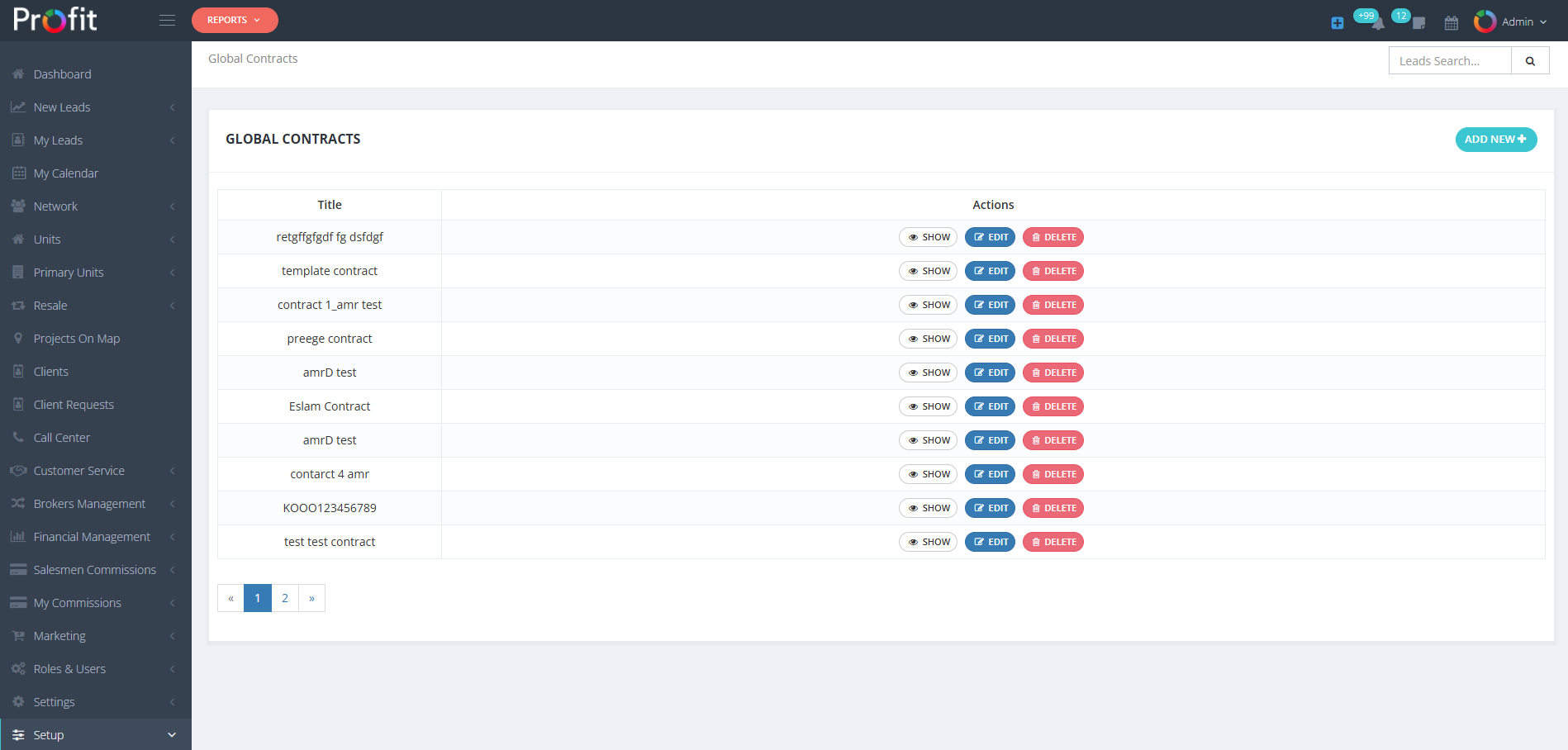
Comprehensive Global Contracts Management System with Template Overview and Control Options
➕ Creating New Global Contracts
Creating new contracts opens a dedicated contract editing interface in a new tab, providing professional contract composition tools with automated data integration capabilities for comprehensive legal document creation and management.
🚀 Contract Creation Process
🔘 Initiate Contract Creation
Click the "Add New Global Contract" button to open the contract composition interface in a new tab. This dedicated contract editor provides professional tools for legal document creation with integrated data automation capabilities.
📌 Professional Interface: The new tab environment provides focused contract editing without distractions from other CRM functions, ensuring professional legal document composition.
📸 Contract Creation Interface
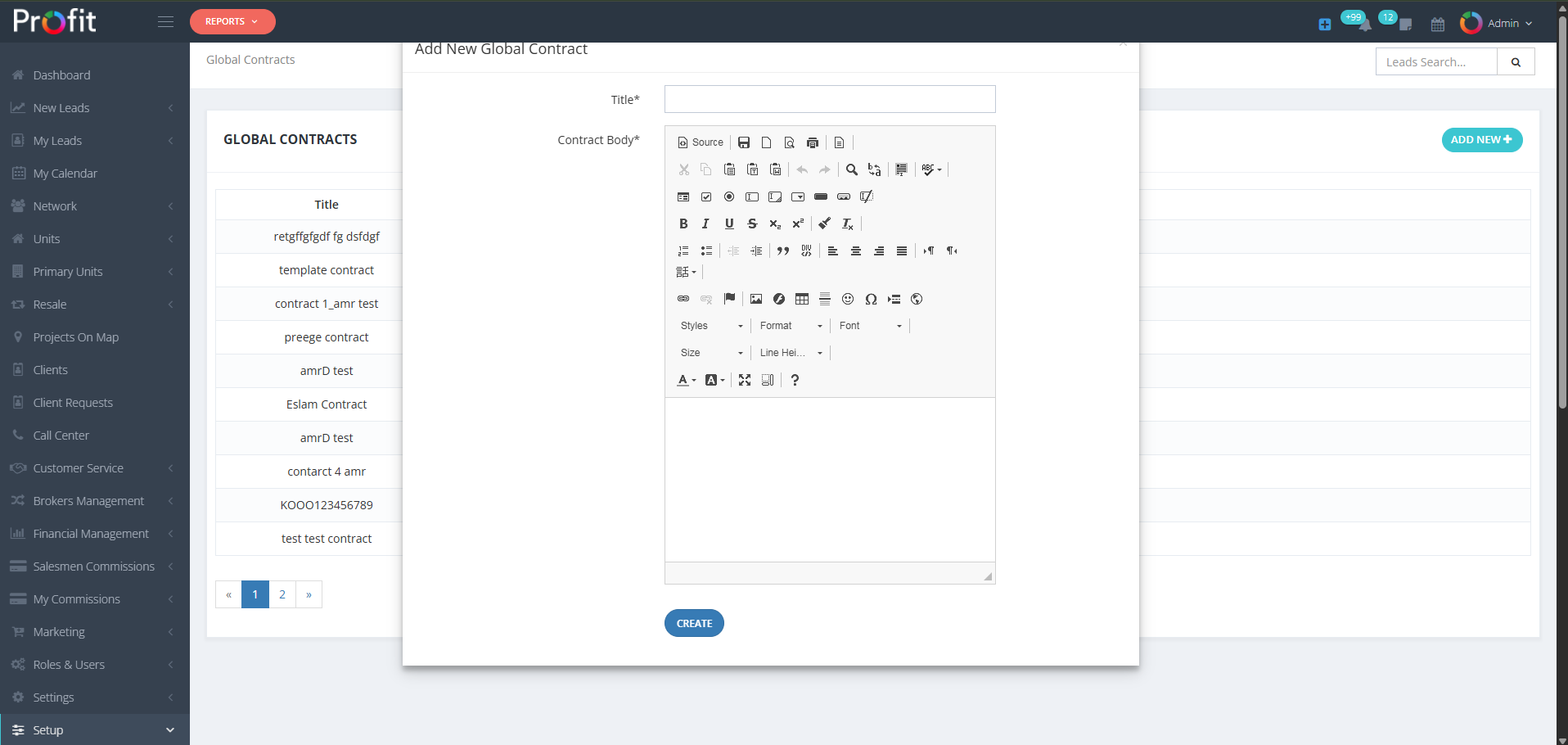
Professional Contract Creation Interface with Title and Body Fields for Legal Document Development
📝 Contract Configuration Fields
The contract creation interface provides two essential fields for comprehensive contract development with automated data integration capabilities for professional legal documentation.
🏷️ Title* (Required)
Contract Title: Enter a clear, descriptive title for your contract template that identifies its purpose and legal application. This title will appear in contract selection lists throughout the system.
💡 Examples: "Property Purchase Agreement", "Rental Contract", "Broker Commission Agreement", "Property Management Contract"
📄 Contract Body* (Required)
Legal Document Content: Write the complete contract text with legal terms, conditions, and clauses. Use Document Words for automated data integration to populate client, broker, project, and agent information automatically.
🎯 Automated Integration: Document Words enable automatic data population from the CRM system into your legal contract text.
🔤 Document Words Automated Data System
Document Words is the powerful automation system that enables automatic data retrieval from the CRM database directly into your contract templates. This system provides predefined shortcuts that automatically populate with client, broker, project, and agent information when contracts are generated.
🎯 Automated Data Integration Examples
📋 Common Document Words Examples
The following Document Words automatically populate with real-time data from the CRM system when contracts are generated:
-mobile-Client mobile
-email-Client email
-name-Client name
-title-Client title
-landline-Client landline
-unit_type-Client unit type
📝 Practical Contract Text Example
Below is an example of how Document Words are integrated within actual contract text for automated data population:
Second Party: Mr./Mrs. -name- - Nationality: -form_field_nationality-
Holds Passport / National ID Number: -form_field_civil_idpassport_number-
Place of Residence: -form_field_address-
Legal Correspondence Address: -form_field_address_2-
Phone Number 1: -mobile- Phone Number 2: -form_field_mobile_2-
🎯 Automated Population: When contracts are generated, all Document Words (highlighted in red) are automatically replaced with actual client data from the CRM system, creating professional, personalized legal documents.
✅ Professional Review & Creation Process
After completing contract content with Document Words integration, follow the professional review process to ensure legal accuracy and technical functionality before finalizing your contract template.
🎯 Professional Review Protocol
🔧 Technical Review
Technical Validation: IT technical staff should review Document Words integration, verify automated data population functionality, and ensure proper system integration before contract deployment.
🛠️ Technical Focus: Verify all Document Words codes work correctly and data populates accurately from CRM fields.
⚖️ Legal Review
Legal Validation: Legal consultants must carefully review contract content, terms, conditions, and legal language to ensure compliance with applicable laws and professional legal standards.
📋 Legal Focus: Verify legal accuracy, compliance requirements, and professional legal terminology throughout the contract.
✨ Contract Creation
Final Creation: After technical and legal review approval, click the "CREATE" button to save the contract template. The contract will be available throughout the system for professional use.
🎯 Ready for Use: Created contracts are immediately available for selection and generation throughout the CRM system.
💡 Contract Development Best Practices
📝 Document Words Mastery
Master the Document Words system to create fully automated contracts. Test all data integration points to ensure accurate population of client, broker, project, and agent information.
⚖️ Legal Compliance
Ensure all contract templates comply with local real estate laws and regulations. Regular legal review updates are essential to maintain compliance with changing legal requirements.
🔄 Regular Updates
Maintain current contract templates by regularly reviewing and updating terms, conditions, and automated data fields to reflect business changes and legal updates.
⚠️ Administrator Legal Notice
Global Contracts Legal Warning: Contract templates directly impact legal documentation and client agreements throughout your real estate operations. All contracts must undergo thorough technical and legal review before deployment. Incorrect Document Words integration can result in incomplete or inaccurate legal documents. Changes to existing contracts may affect ongoing transactions. Coordinate with legal counsel and technical staff before implementing contract modifications. Ensure backup procedures for all contract templates and maintain version control for legal compliance tracking.